Sharing a file should never mean sharing your account. Yet the quickest way to send a document, handing someone your phone unlocked or, worse, your password, is still surprisingly common. Cloud sharing links exist precisely to avoid that: a link grants access to one file or one folder, on terms you choose, and it can be switched off when its job is done. Used carelessly, though, a link becomes its own risk, because anyone who holds it may hold your file.
This guide explains how sharing links really work behind the X-plore screens, which settings deserve your attention, and how to tidy links up afterwards. X-plore browses your cloud accounts, but the sharing rules themselves belong to each provider, so several steps happen in the provider’s app or website. The APKPod homepage links the wider cloud series, including how to link Google Drive, MEGA and OneDrive in the first place.
Understand What a Sharing Link Actually Grants
A sharing link is a capability: possession is permission. Some links let anyone who has them view a file, others allow editing, and folder links can expose everything placed in that folder later, including files you add months afterwards without thinking about the old link. Links can also be forwarded. The person you send a link to can pass it on in seconds, and you will not be notified.
Viewer, commenter and editor are very different gifts
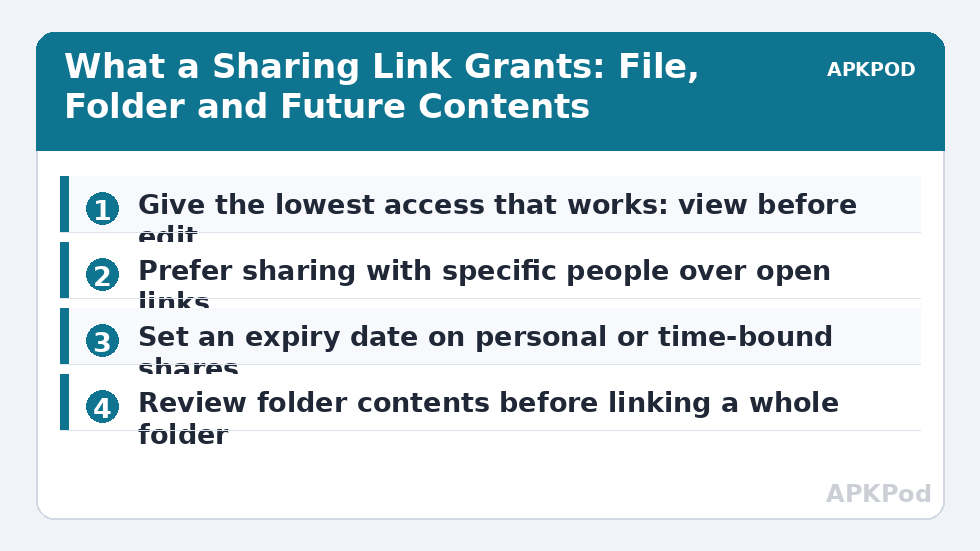
Give the lowest access that does the job. A finished report needs a viewer link. A document under review might need commenting. Editing belongs to genuine collaborators, because an editor can change or delete content that others rely on. If you are sharing photos from a family event, viewing and downloading is plenty; nobody needs edit rights over your originals.
Expiry dates and passwords where providers offer them
Some providers let you set an expiry date on a link or protect it with a separate password. Use expiry for anything time-bound, such as application documents or a house-viewing pack. If you set a link password, send it through a different channel from the link itself: link by email, password by message. Sending both together in one message defeats the point.
Bottleneck:
Tip:
All figures are estimates under good local conditions — strong signal, no competing traffic, both devices on the same network. Real speeds drop with distance, walls, channel congestion and slow storage on either device. Protocol options (SMB, FTP, SFTP) assume a 5 GHz-class Wi-Fi link.
Sharing From X-plore Without Exposing Your Account
Start in X-plore by locating the exact file in the correct cloud account, and pause to confirm which account you are in, especially if you keep work and personal drives side by side. Where X-plore offers a share or link option for the connected service, use it and then open the provider’s own interface to review the link’s settings before sending it anywhere. Where it does not, open the provider’s app or website, find the same file, and create the link there. The file is identical; only the doorway differs.
| Sharing choice | Appropriate for | Main risk |
|---|---|---|
| Anyone with the link can view | Public handouts, event photos | Link forwarded beyond your audience |
| Specific people only | Personal or work documents | Recipient must sign in; slower but controlled |
| Folder link, can view | Growing photo albums | Future files added are shared automatically |
| Folder link, can edit | True team collaboration | Contents can be changed or deleted by others |
Prefer specific-people sharing whenever the recipients have accounts with the provider. It ties access to identities you can later remove one by one, instead of a link floating free in old message threads. Our companion guide to a family shared cloud folder without sharing passwords applies exactly this principle to households.
The Clean-Up Most People Never Do
Links rarely expire on their own, and old links are invisible until you go looking. Once a quarter, open each provider’s shared or managed links view and work down the list. Anything whose purpose you cannot immediately name is a candidate for switching off. Job applications from last year, a folder shared with a tradesperson for one quote, a document sent to an address you no longer use: turn them all off. You can always create a fresh link in a minute if someone genuinely still needs access.
A two-minute pre-send checklist
- Right file, right account: confirm the file and the cloud account it lives in.
- Lowest access: view unless collaboration truly requires more.
- Expiry set: for anything personal, financial or time-bound.
- Folder contents reviewed: check what else sits in a folder before linking the whole folder.
- Removal date noted: if no expiry exists, note when to revoke it manually.
Tidying links belongs in any regular security routine, alongside reviewing connected apps and tokens. Our cloud security and privacy audit checklist combines all of these into one repeatable session. And remember the boundary that matters most: no legitimate sharing task ever requires your account password, your sign-in code, or an unlocked phone handed over. Any process asking for those is the wrong process.
Sharing With People Who Struggle With Technology
Sometimes the recipient is a parent who finds accounts confusing, and the temptation is to simplify by over-sharing. Resist it. A view-only link to one album works without any sign-in at most providers and is far safer than adding someone to your whole account or sharing credentials. Send the link, then call and talk them through opening it. You keep control, they get the photos, and nothing about your account has been exposed in the process.
Worked Scenario: Sending House Documents Without the Keys to the House
Imagine you are selling a home and the buyer’s solicitor needs your identity document, proof of address and a signed form. The unsafe route, still used daily, is to photograph everything and send it through whatever channel asks first, or to share a folder containing far more than the transaction needs. The link-based route is tidier. Place exactly the three requested documents in a fresh folder, share that folder with the solicitor’s specific work address rather than an open link, and set an expiry if your provider offers one. Send a short message saying the folder contains only those items and that you will close it when the sale completes.
When the completion letter arrives, close the link the same day. Then check the folder’s activity view if your provider offers one, so you know the documents were actually collected, and file the closed folder away or delete it according to your own record-keeping needs. Notice what never happened: nobody received your password, nobody saw the rest of your drive, and the access you granted ended on a date you chose. The same pattern scales down to everyday life, a single form for a school, a single payslip for a letting agent, each shared narrowly and closed deliberately.
When a recipient says the link does not work
Resist the urge to fix access problems by widening access. Most failures are mundane: the recipient is signed into a different account than the one you shared with, the link expired as designed, or their organisation blocks the provider. Ask which account they are using, re-share to that address if it is genuinely them, and extend an expiry rather than replacing a named share with an anyone-can-open link. Widening in a hurry is how careful setups quietly become open doors.
Frequently Asked Questions
Does sharing a link from X-plore expose my cloud account?
No, not by itself. A sharing link grants access only to the file or folder it points to, under the permissions you set. Your account password and the rest of your files stay private, provided you share links rather than credentials and choose the lowest access level that works.
Can someone forward my sharing link to other people?
Yes. Anyone-with-the-link sharing treats possession of the link as permission, and links can be forwarded freely. For anything sensitive, share with specific people instead, set an expiry date where the provider offers one, and revoke the link when its job is done.
If I add files to a shared folder later, are they shared too?
Usually yes. A folder link covers the folder’s contents as they change, so files added afterwards become accessible to link holders. Review a shared folder’s contents before adding anything private, or share individual files instead.
How do I stop a link I shared months ago?
Open the provider’s app or website, find the file or folder, and open its sharing or manage access panel. Turn link sharing off or remove the people listed. Checking the provider’s shared-links view once a quarter catches links you have forgotten creating.
Should I ever share my cloud password so someone can get a file?
Never. A password hands over your entire account, including files, settings and recovery options. Create a view-only link to the single file instead, or share the folder with that person’s own account. Both take about a minute and expose nothing else.